v1.0.0 · Available
AddBriefly
Turn an out-of-scope request into a fee, deadline impact, and client-ready change note
Turn an out-of-scope request into a fee, deadline impact, and client-ready change note
No AI. Runs locally. No account. No subscription. Client data is not sent to an AI service. For fixed-price freelancers when a client asks for work beyond the agreed scope. Enter your own estimate once and turn it into an additional fee, schedule impact, and structured change note ready to review and send.
The problem
Re-explaining the situation, rewriting prompts, and manually reconciling the fee, date, and message every time.
Who it is for
Solo fixed-price web designers, web developers, and small agency owners responding to out-of-scope client requests.
The outcome
A consistent client-ready change note that keeps your chosen fee, added scope, and revised deadline aligned—without prompting, an account, or a subscription.
See the local workflow
How it works
- Enter the original price, scope, deadline, and included revisions.
- Describe the additional request, estimate its hours and revisions, and enter your hourly or daily rate.
- Enter the schedule impact you can accommodate.
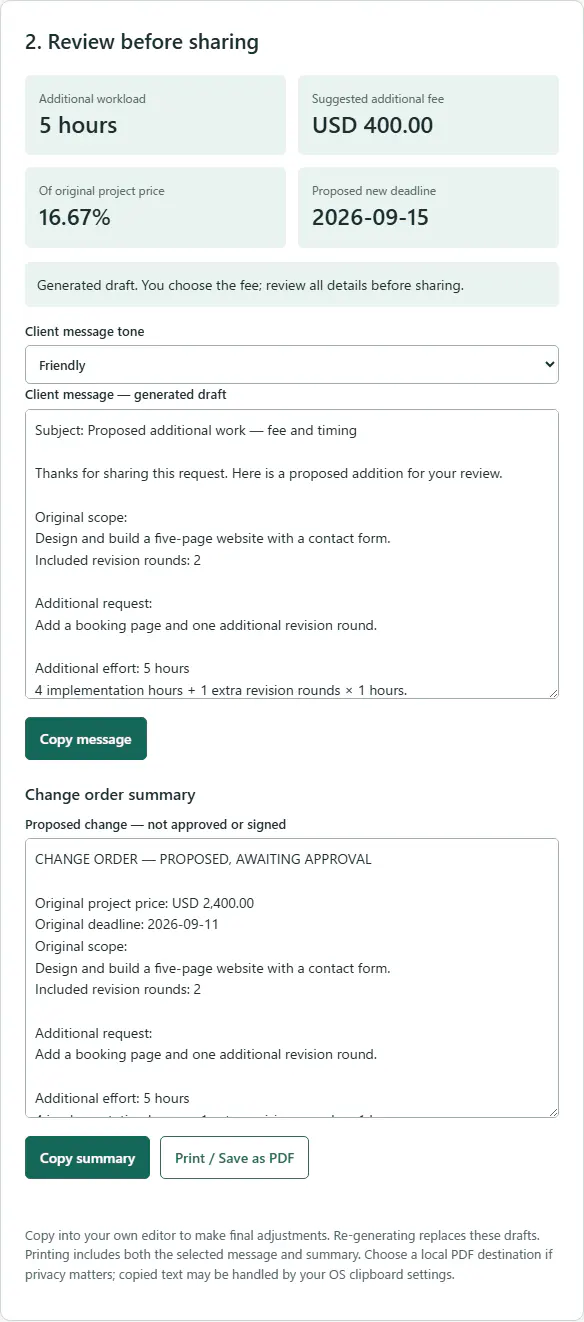
- Review the proposed fee, percentage of original price, and revised date.
- Choose a Friendly, Professional, or Firm English message. Copy the message or change summary, or print/save as PDF using your browser.
Included
- Additional-fee and revised-deadline summary
- Friendly, Professional, and Firm fixed English message tones
- Client-ready proposed change note with copy and print/PDF
Your data, on your device
Runs locally in your browser. No prompting, account, subscription, API key, server, or project connection. No client data is sent to an AI service or uploaded anywhere. No product analytics. No autosave: copy or print before closing.
Know the limits
Tested on Windows Chrome and Edge. Other modern desktop browsers have not yet been verified. JavaScript is required. Business communication aid, not legal, accounting, or tax advice. You choose hours, fee, schedule, and wording. No contract interpretation, payment guarantee, CRM, invoices, e-signatures, cloud storage, tax calculation, currency conversion, or public-holiday calendars.
Questions, answered
Are future updates or custom development included?
Future updates and custom development are not promised.
Can I try the numerical estimate first?
The free Scope Creep Cost Calculator estimates additional work value, project value increase, and revised project value. It does not create client messages.
Does it use AI?
No. It uses transparent calculations and fixed English templates, not custom AI writing. The consistent structure keeps scope, fee, deadline, and the approval request together for you to review.
Does it save my projects?
No. Copy the output or use your browser’s print/PDF option before closing.
Does it decide my deadline?
No. You enter the additional Monday–Friday days. Public holidays are not excluded.
Is it a contract or invoice?
No. It generates a proposed change summary and an approval request. It does not capture agreement or signatures.